
You can make ChatGPT answer questions from your own website's content without writing any code — use Buildship's web crawler to pull your pages into a JSON file, then upload it to ChatGPT as knowledge.
One of ChatGPT's most useful features is that it lets you upload your own knowledge for the AI to learn from and draw on when answering questions.
That knowledge can take many forms: text and documents as PDF, data for analysis as CSV, or structured formats like JSON — which is now the standard response format for most web services.
Chances are you already have a lot of text-based content. Maybe you run a website with years of articles behind it, or you publish lessons and user guides as web pages that you would love a chatbot or AI to answer questions from.
In this guide we will use Buildship's web crawler (a GPT Crawler template) that runs entirely through a simple UI — no installation needed, just pick the template and configure it.
You can build a ChatGPT knowledge base directly in Buildship: the crawler outputs a JSON file that is ready to upload to your Assistant.
Overview: From Website to AI Knowledge
The idea is simple: a web crawler visits the pages of your website, collects their content, and saves everything as a single JSON file. You then upload that file to a ChatGPT Assistant as knowledge, and the AI can answer questions using your own content.
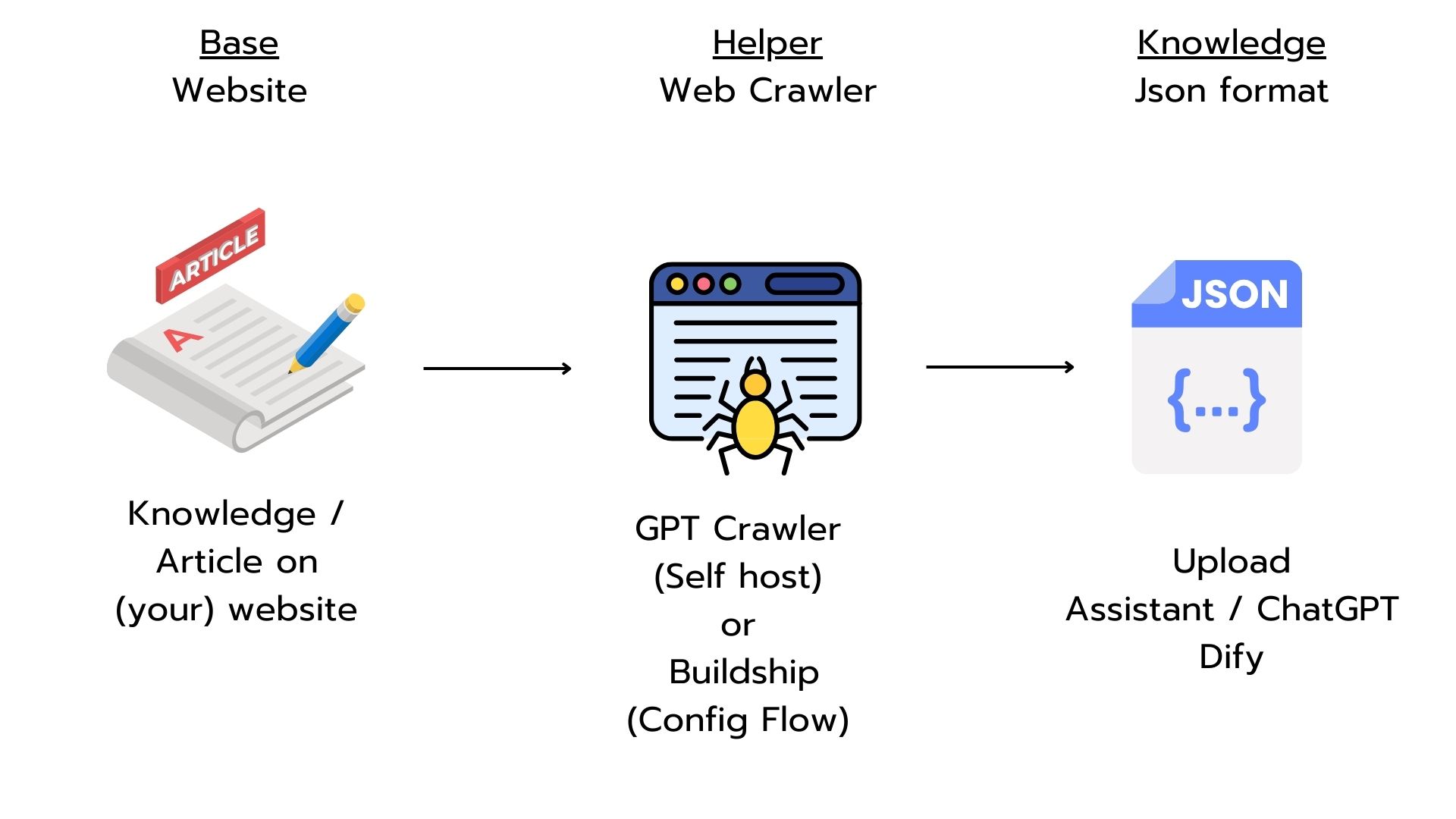
You could run the open-source GPT Crawler package on your own machine. That route gives you flexible configuration and no usage limits beyond your computer's own resources — but the installation involves quite a few steps, which can be a real hurdle if you are not a technical person.
While looking for an easier path, we came across Buildship, a platform for building backends without writing code. It already ships with a web crawler template, which is exactly why we picked it for this tutorial.
Building the Web Crawler in Buildship
Buildship is a low-code — almost no-code — platform that lets you build your own backend workflows, and it comes with a ready-made web crawler template. You simply open the template, point it at your website, and adjust a few settings; there is nothing to install and no server to manage.
Buildship also publishes plenty of interesting templates and tutorial videos on YouTube, so the fastest way to get started is to follow their official walkthrough.
Follow Along with Buildship's Video Tutorial
The video below covers the whole process, and you can follow it step by step. The UI may look slightly different today than it does in the recording, but the overall flow is the same.
Use the Knowledge File in ChatGPT
The JSON file from the web crawler can be uploaded as a knowledge file in two places: a Custom GPT built with ChatGPT's GPT Builder, or an Assistant created through the OpenAI API. Both support file uploads that the AI uses as reference material when answering questions.
Once uploaded, the AI draws on the file's content when it responds, so its answers about your website's content become much more accurate — ideal for building a chatbot that answers questions from your own articles, guides, or service information.
Summary: What You Get and What to Watch Out For
At this point you have a working no-code GPT crawler: point it at a website, run it, and download a JSON knowledge file ready for your ChatGPT Assistant. The main caveat is Buildship's execution-hours limit — if you want to use it seriously, factor the cost of a paid plan into your decision.
Buildship is a backend builder at heart, so you could go one step further and create an API-call workflow that uploads the JSON knowledge file for you automatically. We have not tested this ourselves yet, but the pieces are all there.
Good luck!